![FastAPI Installation Demystified: Should You Use fastapi, [standard], or [all]?](https://res.cloudinary.com/dcefnhpy2/image/upload/v1777280556/blogs/featured/wmjqz3dyqfqxovvekxmk.webp)
Developer Playbook
FastAPI Installation Demystified: Should You Use fastapi, [standard], or [all]?
In this guide, we’ll break down the “Extras” syntax in Python, compare each installation tier, and give you the definitive recommendation.
Which FastAPI Install Should You Use in 2026?
The first time I installed FastAPI, I genuinely thought I had messed something up. I installed it, ran my app… and nothing worked. No server, no clear hint of what was missing. After double-checking my code and the docs, I realized the issue wasn’t FastAPI at all — it was how I installed it. FastAPI is intentionally minimal by default, and once you understand its installation options, everything suddenly makes sense.
If you are just getting started, the very first hurdle isn’t the code — it’s the terminal. You’ll likely see three different commands floating around documentation and tutorials:
pip install fastapipip install "fastapi[standard]"pip install "fastapi[all]"
Which one is right for your project? If you pick the wrong one, your app might fail to start, or you might bloat your production environment with unnecessary packages.
In this guide, we’ll break down the “Extras” syntax in Python, compare each installation tier, and give you the definitive recommendation for 2026.
The Philosophy: Why Not Just One Package?
FastAPI follows a modular design philosophy. Unlike “batteries-included” frameworks like Django, FastAPI aims to be a lightweight core. It relies on a high-performance ecosystem of tools but doesn’t force them on you unless you need them.
By using Python’s extras syntax (the [...] brackets), FastAPI allows you to opt-in to features. This keeps your deployment:
- Lightweight: Small Docker images.
- Secure: Fewer dependencies mean a smaller attack surface.
- Flexible: You choose your own ASGI server or template engine.
1. pip install fastapi (The "Naked" Core)
pip install fastapi
This installs the bare essentials required to write FastAPI code, but not to run it.
What’s Included?
- fastapi: The framework logic.
- starlette: The underlying ASGI toolkit.
- pydantic: For lightning-fast data validation and serialization.
The Catch
This version does not include an ASGI server. If you try to run uvicorn main:app, your terminal will throw an error: command not found: uvicorn.
Best For: Advanced developers building custom Docker images who want to pin specific versions of Uvicorn or use alternatives like Hypercorn.
Using pip
$ pip install fastapior using UV
$ uv add fastapi2. pip install "fastapi[standard]" (The Gold Standard)
pip install "fastapi[standard]”
This is the officially recommended default. It includes everything you need to develop and deploy a modern web API.
The Feature Set
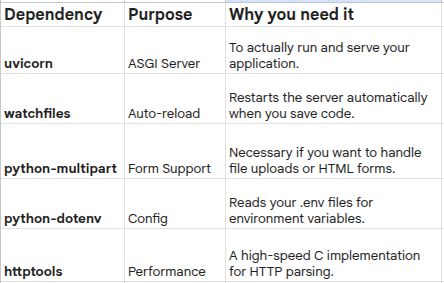
Best For: 99% of developers, beginners, and production-grade applications.
Using pip
$ pip install fastapi[standard]using UV
$ uv add fastapi[standard]3. pip install "fastapi[all]" (The Kitchen Sink)
pip install "fastapi[all]”
This is the “everything plus the kitchen sink” option. It installs every optional dependency FastAPI might ever interact with.
What’s the downside?
While it sounds convenient, [all] can lead to "Dependency Hell." It installs specialized libraries for email validation, template engines (Jinja2), and experimental features. This leads to slower CI/CD pipelines and larger cloud hosting costs.
Best For: Rapid prototyping or following a tutorial where you don’t want to stop and install individual packages.
$ pip install fastapi[all]using UV
$ uv add fastapi[all]Comparison Table: Which One Wins?
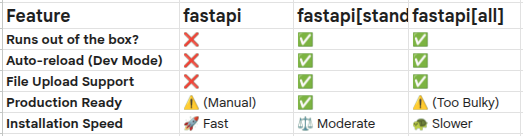
Quick Start Guide: The Perfect Setup
If you are starting a new project today, follow these steps to ensure a clean, professional environment:
Step 1: Create a Virtual Environment
# Create the environment
python -m venv venv
# Activate it (Windows)
venv\Scripts\activate# Activate it (Mac/Linux)
source venv/bin/activate
Step 2: Install Standard
pip install "fastapi[standard]"
Step 3: Verify the Install
Create a main.py and run it:
Python
from fastapi import FastAPI
app = FastAPI()@app.get("/")
def read_root():
    return {"Hello": "World"}
Run with: fastapi dev(The modern way to start development).
Final Verdict
Don’t overthink it. Use pip install "fastapi[standard]".
It provides the perfect balance between “ready-to-use” and “production-lean.” As your project grows, you can always manually add specific libraries, but starting with [standard] ensures you have the right tools for the job without the clutter.
Want to master FastAPI and Web Development?
Check out more deep dives and tutorials at createwitheric.me.
FAQs
What is the difference between pip install fastapi[standard] and pip install fastapi?
The core fastapi package contains only the framework logic (Starlette and Pydantic). If you install it alone, you will lack an ASGI server to run your code. In contrast, fastapi[standard] is the recommended installation for most developers; it includes the FastAPI CLI, the uvicorn server, and essential tools for local development and deployment.
Why should I avoid using pip install "fastapi[all]" in production?
While fastapi[all] is convenient for rapid prototyping or following tutorials, it installs every possible optional dependency, including specialized libraries for email validation, Jinja2 templates, and experimental features. Using this in production can lead to "Dependency Hell," significantly larger Docker image sizes, and slower CI/CD pipeline builds. For production-grade applications, it is better to use [standard] and manually add only the specific extra libraries your project requires.
Can I run a FastAPI app without installing any "Extras"?
Technically, yes, but you will need to manually manage your server environment. If you only install pip install fastapi, you must separately install an ASGI server like Uvicorn or Hypercorn. This "minimalist" approach is common among advanced developers building highly optimized, custom Docker containers who want to pin specific versions of every sub-dependency to minimize security vulnerabilities and overhead.
Discuss This Topic
Want this applied to your project? Book a call or message me directly.
Live schedule
October 2026
No slots
No slots
No slots
No slots
No slots
No slots
No slots
No slots
No slots
No slots
No slots
No slots
No slots
No slots
No slots
No slots
No slots
No slots
No slots
No slots
No slots
No slots
No slots
No slots
No slots
No slots
No slots
No slots
No slots
No slots
No slots
No slots
No slots
No slots
No slots
or